I Built a Contract-to-Invoice Web App in One Afternoon Using Claude AI — Here's Exactly How

Why I Built This
Every month our finance workflow looked the same: open newly signed contract PDF, find the billing terms, copy them into a spreadsheet, create an invoice. Multiply that by 30 clients with individually negotiated agreements and it's a few hours job that should take five minutes.
Another problem was the error rate. When you're manually copying fee amounts, VAT numbers, and billing dates from PDFs into a spreadsheet, mistakes happen. Each one requires a correction, a credit note, an awkward email. At an early stage, that kind of friction with clients costs more than the hours it takes to fix.
And the contracts themselves don't help. Early-stage B2B agreements are rarely standardised — every client negotiates something slightly different. Ramp-up pricing, usage-based fees, quarterly billing in advance, daily rates for integration work. No two contracts look the same, which means no template or off-the-shelf tool ever quite fits.
I looked at the standard options — sevDesk, lexoffice, easybill. They all share the same limitation: they assume your services live in a product catalogue. When every contract has custom pricing, you end up doing manual data entry regardless of which tool you use.
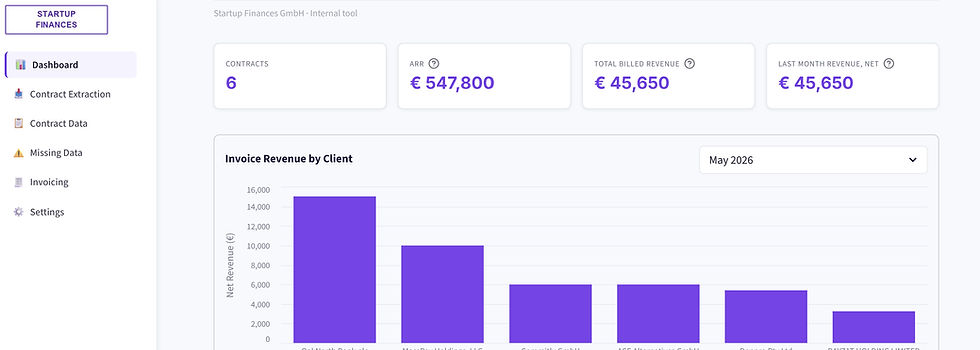
So I built something instead. A web app that reads signed PDF contracts, extracts all billing data using Claude AI, manages a missing data workflow, generates compliant invoices, and handles approvals — all in a browser, accessible to the whole team, free to host. The app also includes a dashboard with a live overview of ARR, billed revenue, and invoiced revenue by client — useful context without opening a spreadsheet. Here's exactly how I built it, including the prompts.
What I Used
Claude Code — Anthropic's command-line coding agent that writes and runs code for you
Streamlit — Python framework for building web apps, free to deploy
SQLite — single-file database, no server needed
Anthropic API — Claude reads the PDFs and extracts structured data
WeasyPrint + Factur-X — PDF invoice generation with ZUGFeRD compliance
Step 1 — Validate the Extraction First
Before building anything, I tested whether Claude could actually extract the right data from my contracts. I used Claude Code to build a quick Python script that sent PDFs to the API and wrote results to Google Sheets.
Prompt I used:
Build a Python script for contract data extraction. Client PDFs: one subfolder per client in the current folder, process only PDFs with "signed" in filename. Anthropic API key: [KEY] Extraction (send PDF natively as base64 to claude-opus-4-5, return JSON only): - Company name, country, city, postcode, street and number - Contract signature date (latest across all signatories) - Billing start date, contract end date - Service name, fee amount, currency, billing cycle, payment terms - Client VAT number, client type (B2B/B2C) - One row per service line — repeat client info across rows VAT logic: - Non-EU → 0%, note "Outside EU — no VAT" - EU B2B with VAT number → 0%, note "Reverse charge" - EU B2C without VAT number → local country rate Write results to Google Sheets. Install dependencies and run once. |
Result: 4 of 6 contracts extracted correctly on the first run. The 3 failures were an API credit issue, not an extraction error. Validation done in under an hour.
What I learned: Test on your messiest contract first — the one with the most complex fee schedule or the oldest scan quality. If it works on that, it'll work on everything.
Step 2 — Build the Streamlit App
Once extraction was validated, I rebuilt everything as a proper web app. One prompt to Claude Code:
Build a Streamlit web app for contract extraction and invoicing. SQLite database, deployable to Streamlit Cloud. Tech stack: Streamlit, SQLite, Anthropic API (claude-opus-4-5), Google Drive API, WeasyPrint. Database: contracts, invoicing, missing_data, invoices, invoice_sequence tables. 5 pages: PAGE 1 — Contract Extraction - "Scan" button: finds new signed PDFs in Google Drive not yet in DB - Checklist to select which to process - "Extract" button: sends to Claude, stores in DB, progress bar per file PAGE 2 — Contract Data - Searchable sortable table, filter by client/country/currency - Click row to expand, export to CSV PAGE 3 — Missing Data - Table of unresolved missing fields - Inline editable "Filled Value" per row - Save syncs value back to contracts and invoicing tables PAGE 4 — Invoicing & Approval - Month picker, preview table, "Generate" button → creates Draft PDFs - Invoice Log with actions: Draft: Preview + Approve and Reject buttons Approved: Issue a credit note buttons PAGE 5 — Settings - API keys, Drive folder IDs - Company name, address, tax number, VAT ID for invoice header Invoice numbering: INV-YYYY-NNNN, sequential, thread-safe, voided numbers never deleted. Invoice PDF: WeasyPrint, all mandatory §14 UStG fields, reverse charge notice where applicable. Create requirements.txt, .streamlit/config.toml, README with Streamlit Cloud deployment steps. Run locally to confirm all 5 pages load. |
What I learned: Streamlit is the right choice for internal finance tools. It looks professional, the whole team can use it from a browser, and deployment is a single button click. For a tool this specific to your workflow, building it yourself takes less time than configuring someone else's product.


Step 3 — Add the Approval Workflow and Audit Trail
Invoices go out with real money attached. The approval step is not optional — and for GoBD compliance (German digital record-keeping rules), neither is a tamper-proof audit trail.
Add approval workflow and invoice numbering audit trail. Approval: - All invoices generated as Draft - "Approve" button: logs approver email + timestamp, updates status to Approved - "Issue a Credit Note" button: creates a credit note for the invoice issues but doesn't delete it - Lock amount, VAT, total, invoice number fields after Approved Invoice numbering: - Format INV-YYYY-NNNN, resets yearly - Thread-safe SQLite transaction — no duplicates - Credit Notes numbers are also sequential Do not change any other functionality. |
What I learned: Build the approval step from day one, not as an afterthought. Once an invoice has been sent, making changes is painful — a proper Draft → Approved → Sent flow catches errors before they reach the client.

Step 4 — Add ZUGFeRD E-Invoice Compliance
Germany is rolling out mandatory structured e-invoicing for B2B transactions — 2027 for larger businesses, 2028 for everyone. ZUGFeRD is the right format: a normal-looking PDF with structured XML embedded inside it, readable by both humans and accounting systems.
Adding it to the existing pipeline was a small change — WeasyPrint still generates the visual PDF, Factur-X embeds the XML:
Add ZUGFeRD e-invoice generation using factur-x library. Compliance level: EN 16931 Comfort. After WeasyPrint generates the PDF, embed structured XML with: - Seller and buyer details, VAT IDs - Line items, VAT breakdown - Reverse charge reason code "AE" where applicable - Outside EU reason code "O" where applicable - IBAN/BIC from Settings Pre-populate Settings with test IBAN DE89370400440532013000 / COBADEFFXXX so the app works out of the box. Validate XML schema before saving. If validation fails, save plain PDF and log the error — do not block invoice generation. Add "ZUGFeRD" badge on Invoice Log for compliant invoices. |
The Full Workflow
Once everything was built, the end-to-end process looks like this:
Client signs contract → saved to Google Drive client subfolder
Open the app → Page 1 → Scan → select new contracts → Extract
Claude reads PDFs, extracts billing data, applies VAT, stores in DB
Missing fields flagged on Page 3 → fill in → auto-synced back
Month end → Page 4 → select month → preview → Generate
PDFs created as Draft, saved to Drive
Approver previews inline → clicks Approve → timestamp logged
What I Would Improve Next
This is a first version built for speed — it works, but given more time I'd improve the UX (a dashboard summary view, bulk-save on missing data, better mobile layout), add DATEV CSV export for the Steuerberater handover, build automatic invoice sending and payment reminders via email, and add reporting — monthly revenue exports to Excel and a Google Sheets sync so finance reports always reflect the latest invoiced data without manual exports.
Building something similar for a different finance workflow? The same approach — validate extraction first, then build the UI around confirmed output — works for any document-heavy process: purchase orders, expense reports, supplier agreements.



Comments